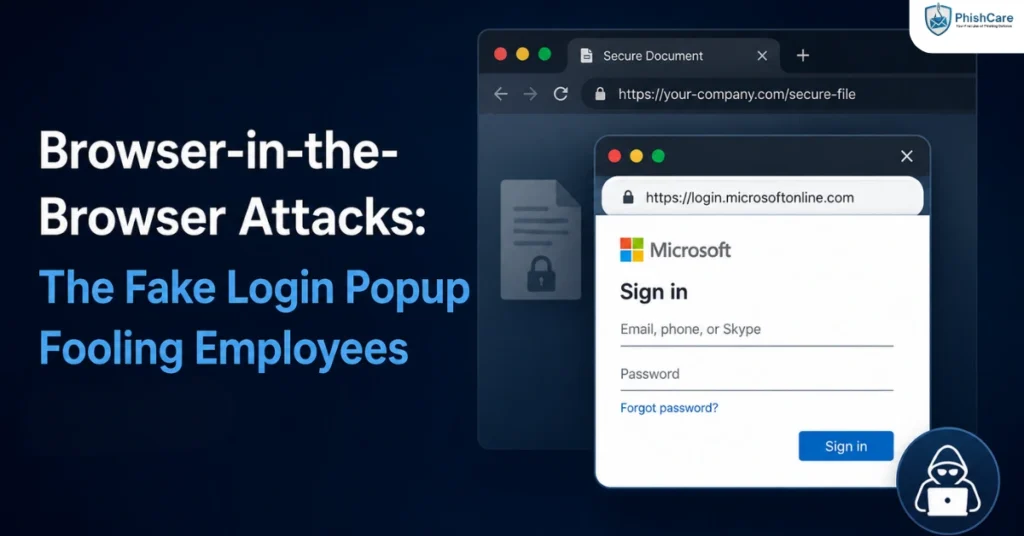
The login popup looks completely real. It has the right logo, the right layout, even a URL bar showing exactly the address you expect. There is just one problem: none of it is a real browser window. It is a picture of one, drawn inside the webpage you are already on, and the address bar you just trusted is not connected to anything. That is a browser-in-the-browser attack, and it is specifically designed to defeat the one habit most phishing training has spent years building: check the URL before you type your password.
This guide explains what browser-in-the-browser attacks are, how they work, a very recent real-world campaign targeting Microsoft 365, and the simple, practical test that reliably exposes them.
In Short: A browser-in-the-browser attack fakes an entire login popup window, address bar included, using HTML and CSS inside a malicious webpage. Because the fake address bar can display any URL the attacker wants, checking the URL, normally the most reliable phishing defense, does not work against this specific technique.
What Is a Browser-in-the-Browser Attack?
A browser-in-the-browser attack, often shortened to BitB, is a phishing technique in which an attacker builds a convincing fake browser popup window entirely out of code on their own webpage, rather than opening an actual new browser window. The fake popup mimics a legitimate single sign-on login prompt, complete with a window title bar, minimize and close buttons, and what appears to be a normal address bar showing a trusted domain.
The technique was first publicly documented by security researcher mr.d0x in 2022, and it specifically targets services that use single sign-on, since users are already accustomed to a familiar login popup appearing when they click “Sign in with Google,” “Sign in with Microsoft,” or similar options. That familiarity is exactly what makes the fake version so convincing.
How Browser-in-the-Browser Attacks Actually Work
The core trick behind BitB is simple to describe and surprisingly effective in practice: the entire “popup,” including what looks like the browser’s own address bar, is rendered using HTML, CSS, and JavaScript inside the malicious page itself. It is not a separate browser window at all, just a very convincing drawing of one.
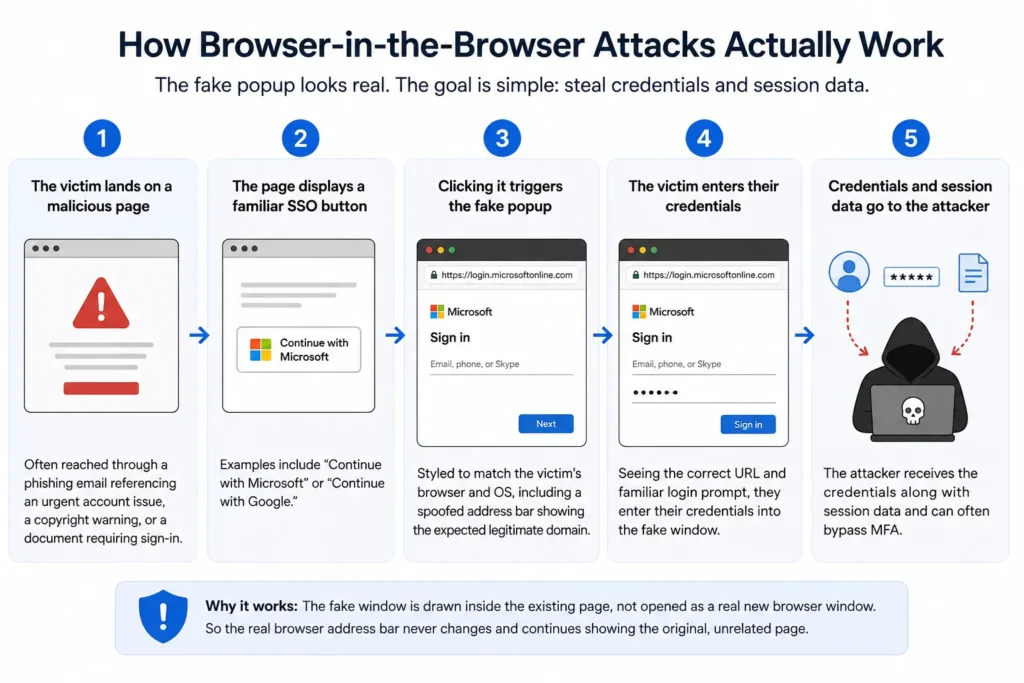
A typical BitB attack chain looks like this:
- The victim lands on a compromised or malicious page, often reached through a phishing email referencing an urgent account issue, a copyright warning, or a document requiring sign-in.
- The page displays a familiar single sign-on button, such as “Continue with Microsoft” or “Continue with Google.”
- Clicking it triggers the fake popup, styled to precisely match the victim’s actual browser and operating system, including a spoofed address bar showing the expected legitimate domain.
- The victim, seeing what appears to be a completely normal login prompt with the correct URL, enters their credentials directly into the fake window.
- Those credentials are sent straight to the attacker, often alongside session data that can be used to bypass multi-factor authentication entirely.
Because the fake window is drawn inside the existing page rather than opened as a genuine new browser window, the real browser’s actual address bar, the one place a user could reliably verify the true destination, never changes and continues showing the original, unrelated page.
A Live Example: The 2026 Microsoft 365 Campaign
BitB is not a theoretical risk. According to Help Net Security’s reporting on research from Palo Alto Networks Unit 42 , a Browser-in-the-Browser campaign identified in June 2026 targeted Microsoft 365 users with fake login popups sophisticated enough to be dragged around the screen and to include working minimize, refresh, and close buttons, removing several of the visual cues users might otherwise rely on to spot a fake window.
The campaign went further than visual mimicry. Researchers found the fake popup was fingerprinted to match the victim’s specific operating system and browser, the underlying credential-harvesting code was isolated inside a sandboxed iframe to resist analysis, and the page included active anti-detection measures, including breaking up visible text to evade simple keyword scanning and redirecting suspected security researchers and automated scanners to a legitimate Microsoft support page instead of the phishing content. This level of sophistication reflects a broader pattern of increasingly professionalized attacks targeting Microsoft 365 accounts specifically, alongside related techniques like device code phishing .
How Browser-in-the-Browser Differs From ConsentFix and Device Code Phishing
BitB, ConsentFix, and device code phishing are increasingly discussed together because all three currently target Microsoft accounts and all three aim to bypass traditional credential and MFA protections. The mechanism behind each is genuinely different, though.
- Browser-in-the-browser is pure visual spoofing. Nothing about the OAuth process is actually touched. The attacker fakes the appearance of a login window entirely, and the victim’s credentials are captured directly by the fake form.
- ConsentFix abuses a genuine OAuth authorization code flow, tricking the victim into pasting a real authorization code into an attacker’s page rather than faking any interface at all.
- Device code phishing abuses the genuine OAuth device authorization grant, with the victim completing an authentic Microsoft login and MFA challenge that gets issued to the attacker instead.
The practical distinction matters for training: a user carefully checking the address bar would catch a ConsentFix or device code phishing attempt failing to look right, since those techniques rely on real Microsoft pages throughout. That same instinct fails completely against BitB, since the fake address bar can display anything the attacker chooses. Employees need to know that URL-checking, while still useful, is not a universal defense against every technique in this family.
How to Spot a Browser-in-the-Browser Popup
Because the fake address bar defeats the usual “check the URL” instinct, a different, more reliable test is needed. According to a ThaiCERT advisory on the technique , the simplest and most reliable test is to try dragging the login popup outside the boundaries of the main browser window. A genuine browser popup can be freely dragged anywhere on screen, including past the edges of the window that opened it. A BitB fake window cannot, since it is not actually a separate window at all, just an element drawn inside the page, so it will stop at the edges of the browser it is embedded in or fail to move independently.
A few additional signals to watch for:
- The popup cannot be moved to a second monitor, if one is available, since it is confined to the browser tab that generated it.
- A password manager will not offer to autofill credentials, since the fake domain shown in the spoofed address bar does not match any saved legitimate entry, even though it visually looks correct.
- The window cannot be resized or minimized independently of the browser tab behind it, unlike a genuine separate popup window.
What This Means for Organizations
A few practical implications follow for security teams and awareness programs:
- URL-checking training needs an explicit caveat. Employees trained only to verify the address bar need to understand that BitB specifically defeats this check, and should be taught the drag test as a supplementary verification step.
- Password managers add a meaningful layer of defense. Since a password manager checks the actual underlying domain rather than the visual address bar, a failure to autofill is one of the most reliable signals available to a typical user.
- This technique reinforces the value of phishing-resistant authentication methods, such as hardware security keys bound to a specific legitimate domain, which are not fooled by a visually convincing fake popup the way a human user can.
Testing Awareness Against This Pattern
Because BitB specifically targets the URL-checking habit most phishing training relies on, testing needs to include this technique explicitly rather than assuming general phishing awareness covers it. Running a realistic BitB-style scenario through a phishing test for employees shows whether your team knows to apply additional verification, such as the drag test, when a login prompt appears unexpectedly. Tracking this alongside other identity-focused attack techniques feeds into a more complete employee phishing risk score .
Final Thoughts
Browser-in-the-browser attacks succeed by targeting the exact defense most phishing awareness training has spent years reinforcing: check the address bar. When the entire popup, address bar included, is a convincing fake, that instinct alone stops working. As attackers continue refining the visual and technical sophistication of these fake windows, awareness training needs to evolve alongside them, adding practical, low-effort checks like the drag test rather than relying on a single verification habit that a well-built fake can now defeat.
FAQ
What is a browser-in-the-browser attack?
A browser-in-the-browser, or BitB, attack is a phishing technique that fakes an entire login popup window, including a fake address bar, using HTML and CSS embedded inside a malicious webpage, rather than opening an actual separate browser window.
How can I tell if a login popup is a browser-in-the-browser fake?
Try dragging the popup outside the boundaries of the browser window it appeared in. A genuine popup can move freely, including past the edges of the original window. A fake BitB popup cannot, since it is not a real separate window at all.
Why doesn’t checking the URL work against BitB attacks?
The address bar shown in a BitB popup is not connected to any real navigation. It is simply drawn to display whatever URL the attacker wants, which means it can show a completely legitimate-looking address even though nothing about it is real.
Is browser-in-the-browser the same as ConsentFix or device code phishing?
No. Browser-in-the-browser is purely visual spoofing with no genuine OAuth activity involved. ConsentFix and device code phishing both abuse real OAuth authentication mechanics, meaning a careful URL check can catch those two but not a well-built BitB fake.
Can a password manager protect against browser-in-the-browser attacks?
Yes, to a meaningful degree. A password manager checks the actual underlying domain rather than the visual address bar, so it typically will not offer to autofill credentials on a fake BitB popup, even if the popup visually looks correct.
Content Reviewed By

Nawaz is a practising security analyst specializing in phishing simulation campaigns, employee awareness assessments, red team exercises, and ethical hacking.
He leads phishing simulation deployments at PhishCare, a product developed by CyberSapiens, with hands-on experience evaluating and deploying phishing simulation tools across organizations in multiple industries and regions globally.
View LinkedIn Profile