If your security team has seen a spike in malware infections that somehow slipped past email filters, endpoint detection, and even employee phishing awareness training, there is a good chance a ClickFix attack is behind it.
ClickFix is one of the fastest-growing social engineering techniques of the last two years, and unlike traditional phishing, it does not rely on a malicious attachment or a link to a fake login page. It relies on something much simpler: convincing a user to copy, paste, and run a command themselves.
In this post, we break down what a ClickFix attack is, how the attack chain works, why it is so effective against traditional security awareness training, and what organizations can do to close the gap.
In Short
ClickFix is a fake CAPTCHA or error-message attack that tricks users into pasting and running a malicious command themselves. No attachment, no link to click, just a paste and an Enter key.
What Is ClickFix?
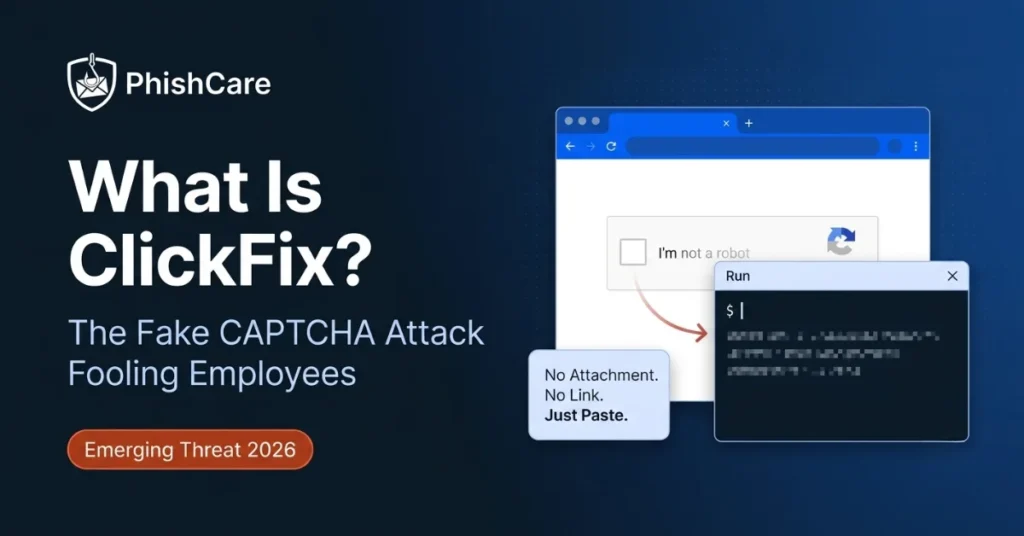
ClickFix, also called ClearFake in some of its early variants and sometimes referred to as a paste and run attack, is a social engineering technique in which an attacker presents the victim with a fake error message, verification prompt, or CAPTCHA. Instead of clicking a button, the victim is instructed to:
- Press Windows key plus R to open the Run dialog, or open a terminal or PowerShell window
- Paste a block of text that was silently copied to their clipboard
- Press Enter
That “verification step” is actually a malicious command. Once executed, it can download and run malware, establish persistence, or hand an attacker remote access to the machine, all without a single file attachment, macro, or drive-by download in the traditional sense.
How the ClickFix Attack Chain Works
A typical ClickFix campaign follows a predictable pattern.
The Lure
The victim lands on a compromised website, a malicious ad, or a phishing email that leads to a page mimicking a familiar service, such as a CAPTCHA check, a Google Meet or Zoom connection error, a fake Cloudflare verification screen, or a document viewer that failed to load.
The Fake Fix
The page displays instructions claiming the user needs to manually verify they are human or resolve an error. Critically, a script on the page has already copied a malicious command to the user’s clipboard the moment the page loaded, so the user never has to type anything themselves.
The Execution
The victim is walked through opening the Run dialog or a terminal and pasting the “fix.” Because they are pasting rather than typing, and because the instructions look like a normal troubleshooting step, most users do not stop to inspect what is actually in their clipboard.
The Payload
The pasted command typically uses legitimate, trusted system binaries such as PowerShell, mshta.exe, curl, or certutil to quietly download and run a second-stage payload, commonly infostealers like Lumma Stealer or Vidar, remote access trojans, or loaders that hand off to ransomware operators.
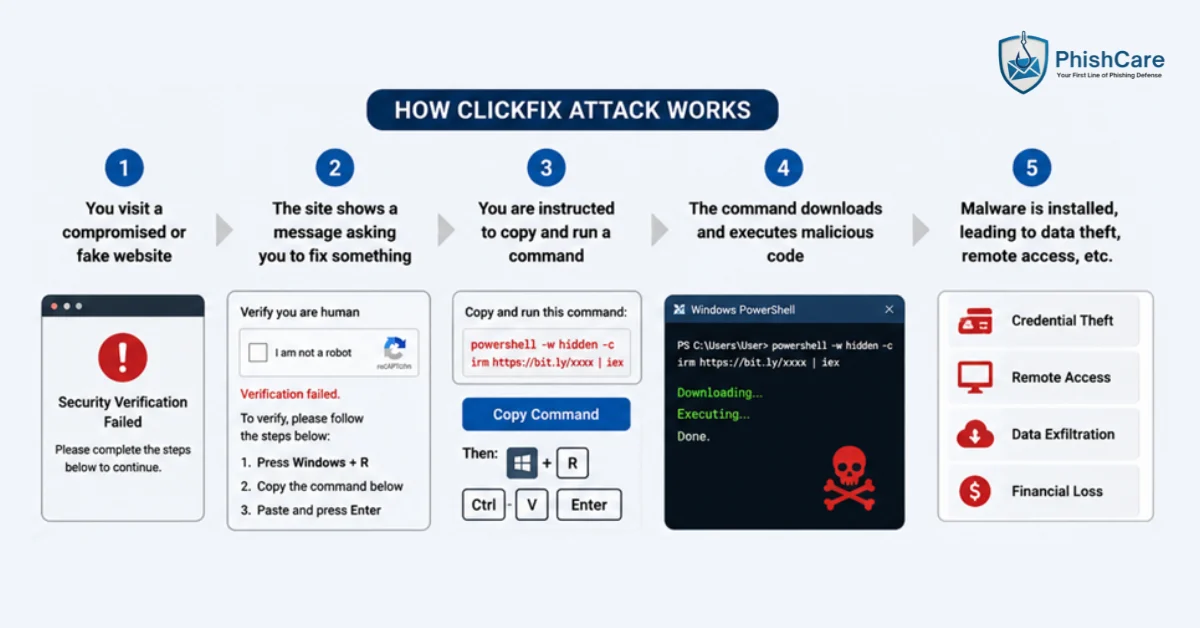
The 4 stages of a typical ClickFix attack chain.
Why ClickFix Bypasses Traditional Defenses
ClickFix is effective precisely because it sidesteps the controls most organizations have spent years building.
No malicious attachment
Email security gateways and attachment sandboxing have nothing to scan.
No malicious link, traditionally
The landing page itself is often hosted on a legitimate but compromised domain, which can slip past reputation-based URL filtering.
The user does the work
Because the victim manually executes the command, security tools that flag automated exploitation often see this as normal, user-initiated activity, especially when it abuses legitimate system tools already trusted by the environment.
It exploits helpfulness, not fear
Traditional phishing training teaches employees to be suspicious of urgency and threats. ClickFix instead frames itself as a routine technical fix, which does not trigger the same instinctive caution.
Real-World Impact
Security researchers have tracked ClickFix-style campaigns impersonating Google Meet, Microsoft Teams, DocuSign, browser update prompts, and even IT helpdesk portals. In its detailed analysis of the technique, Microsoft Security has documented ClickFix campaigns delivering infostealers and loaders across multiple sectors and regions.
Independent research from ESET found ClickFix attacks grew by more than 500 percent in the first half of 2025 compared with the previous six months, making it the second most common attack vector after conventional phishing. The technique has been adopted by both commodity infostealer operators and more sophisticated groups using it as an initial access vector ahead of ransomware deployment. Its low technical barrier and high success rate have made it one of the most reused techniques in current threat actor playbooks.
How to Defend Against ClickFix Attacks
1. Restrict Run dialog and script execution where possible
Group Policy and endpoint tooling can restrict or log use of the Run dialog, PowerShell execution policies, and mshta.exe, reducing the blast radius even if a user is tricked.
2. Monitor for living-off-the-land abuse
EDR rules tuned to flag PowerShell, mshta, or curl processes spawned from browser or Explorer processes can catch ClickFix execution even when the initial lure evades other controls.
3. Reinforce a “verify, don’t paste” culture
Encourage employees to treat any instruction to paste unknown content into a system prompt the same way they would treat an unexpected password request. Pause and verify through a separate channel first.
Technical controls reduce the blast radius, but the third point is ultimately a training problem, and training only works if you know where the gaps are. Simulating a ClickFix-style lure alongside conventional phishing templates in a phishing test for your employees shows which teams would actually pause before pasting. Tracking who falls for these fake-fix lures repeatedly over time is exactly what an employee phishing risk score is built to surface, so follow-up coaching goes to the people who need it most.
Final Thoughts
ClickFix represents a broader shift in social engineering: attackers are increasingly designing lures that exploit user trust and cooperation rather than fear or urgency. As this technique continues to spread across malvertising, compromised websites, and even fake job application portals, security awareness programs that still only teach employees to spot urgent, threatening emails are covering half the picture at best.
FAQ
Is ClickFix a virus?
No. ClickFix is a delivery technique, a form of social engineering, not malware itself. The commands victims are tricked into running can deliver various payloads, including infostealers, remote access trojans, or ransomware loaders.
How do I know if I’ve been hit by a ClickFix attack?
Warning signs include unexpected PowerShell or command prompt windows, unfamiliar processes spawned after visiting a website, or sudden credential and browser data theft. If you recently pasted and ran a “fix” from a website, disconnect from the network and contact your security team immediately.
Can antivirus software stop ClickFix?
Sometimes, if the downloaded payload is a known signature. But because the initial delivery relies on manual user execution of trusted system tools, ClickFix often evades traditional antivirus and requires a combination of user training, EDR behavioral detection, and execution restrictions.
Content Reviewed By

Nawaz is a practising security analyst specializing in phishing simulation campaigns, employee awareness assessments, red team exercises, and ethical hacking. He leads phishing simulation deployments at PhishCare, a product developed by CyberSapiens, with hands-on experience evaluating and deploying phishing simulation tools across organizations in multiple industries and regions globally.
View LinkedIn ProfileWould Your Team Recognize a ClickFix Lure?
Test your employees against realistic social engineering scenarios with a free PhishCare demo account. Free for companies. No credit card. No sales call.