ClickFix taught attackers a valuable lesson: if you can convince someone to run a command themselves, you do not need malware, a link, or an attachment. FileFix takes that same lesson and moves it somewhere organizations have far less ability to control. Instead of the Windows Run dialog, which IT teams can restrict with a Group Policy setting, FileFix uses the File Explorer address bar, a routine part of the operating system that cannot practically be blocked without breaking normal work.
This guide explains what a FileFix attack is, how it differs from the ClickFix attack it evolved from, and why security teams should treat it as a distinct risk rather than a minor variation.
In Short: A FileFix attack is a ClickFix variant that tricks users into pasting a malicious command into the File Explorer address bar instead of the Run dialog, exploiting a Windows feature that administrators cannot simply disable the way they can restrict the Run dialog.
How FileFix Actually Works
If you are not familiar with the original technique, our guide on the ClickFix attack covers the fake-CAPTCHA, paste-and-run pattern that FileFix builds on. FileFix follows the same core idea with a different delivery mechanism.
According to Bridewell’s technical analysis of the technique , FileFix was first published by security researcher mr.d0x in June 2025 as a direct evolution of ClickFix, designed specifically to avoid relying on the Run dialog.
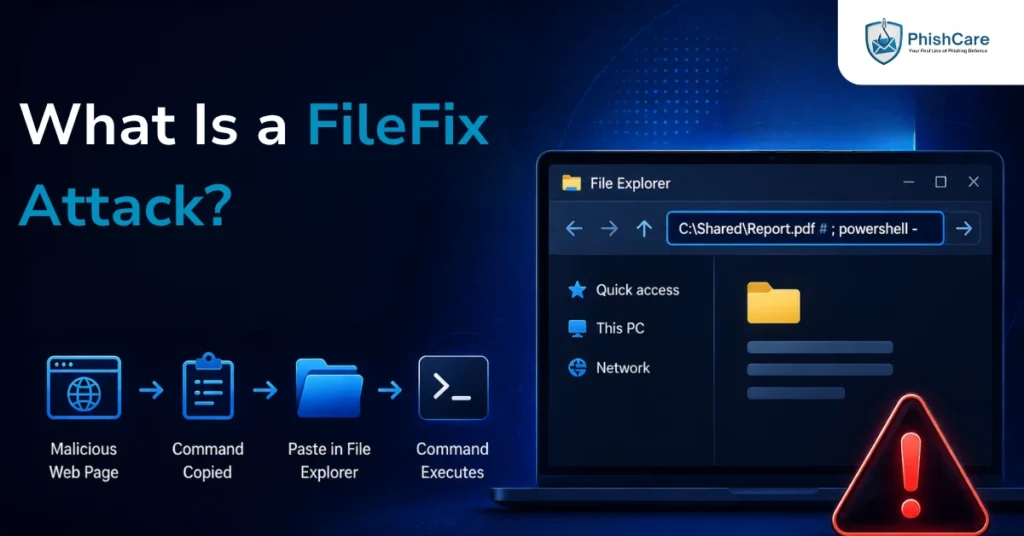
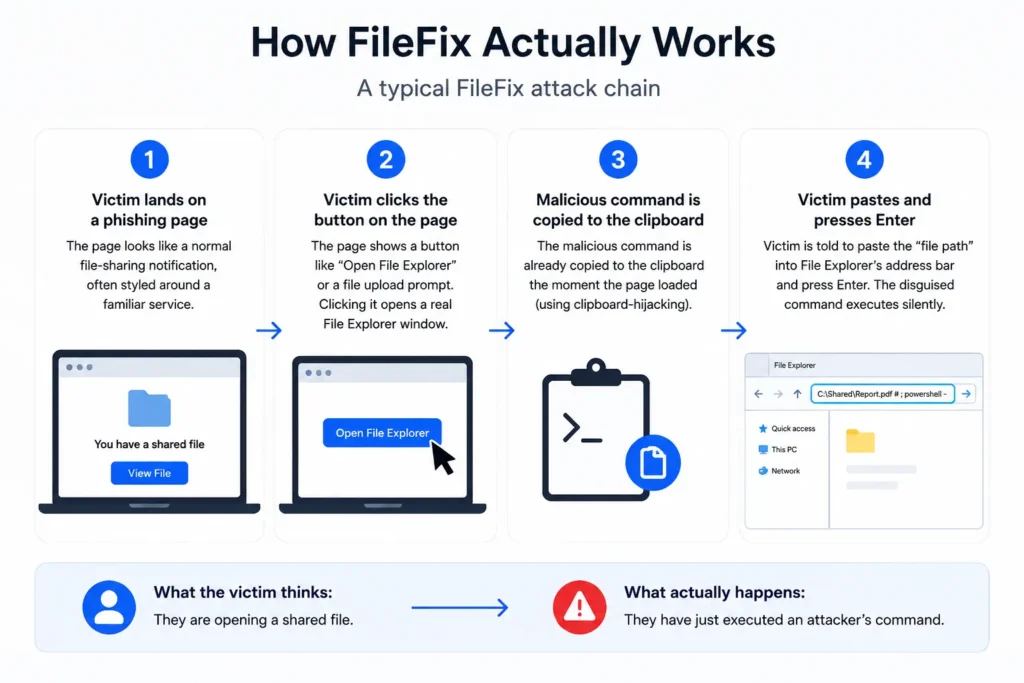
A typical FileFix attack chain looks like this:
- The victim lands on a phishing page presenting what looks like a normal file-sharing notification, often styled around a familiar service.
- The page displays a button, commonly labeled something like “Open File Explorer” or disguised as a file upload prompt. Clicking it does exactly what it claims: it opens a real File Explorer window.
- A malicious command has already been copied to the clipboard the moment the page loaded, the same clipboard-hijacking mechanic used in ClickFix.
- The victim is instructed to paste the “file path” into the File Explorer address bar and press Enter. What actually gets pasted is a disguised command, often a legitimate-looking file path followed by a hidden PowerShell instruction appended after a comment character, keeping the visible text harmless-looking while the malicious portion executes silently.
The victim believes they are opening a shared file. In reality, they have just executed an attacker’s command.
Why FileFix Is Harder to Shut Down Than ClickFix
FileFix is not simply a cosmetic variation on ClickFix. It specifically targets a gap in how organizations typically defend against the original technique. Research from Security Risk Advisors notes that ClickFix had already surged to 47 percent of initial access attacks according to Microsoft’s 2025 Digital Defense Report by the time FileFix emerged, and that FileFix moved from proof of concept to active exploitation in the wild within just 14 days, with more sophisticated variants appearing within 75 days.
A few specific factors make FileFix a harder problem than the original technique:
The Run dialog can be restricted. File Explorer cannot, practically speaking. IT teams routinely block or log Win+R usage through Group Policy. File Explorer is a core part of how people use Windows every day, so restricting it in the same way would break normal work for everyone.
Files opened this way carry no Mark of the Web attribute. This is a technical flag Windows normally attaches to files downloaded from the internet, which triggers additional security warnings and SmartScreen checks. Commands executed through the File Explorer address bar bypass this flag entirely.
It feels more routine to victims than a command prompt. Opening File Explorer and navigating to a file is something most computer users do constantly. It does not carry the same “this looks technical and unusual” hesitation a Run dialog or terminal window might.
Variants are evolving quickly. Within months of the original disclosure, researchers had already documented versions incorporating steganography, hiding malicious payloads inside image files, and campaigns delivering remote access trojans and infostealers such as Interlock RAT and StealC.
What This Means for Organizations
FileFix reinforces a pattern security teams are seeing across an entire family of related techniques, including the ClickFix attack it evolved from and unrelated but similarly structured attacks like device code phishing , all of which succeed by getting a user to complete a legitimate-looking action themselves rather than by exploiting a technical vulnerability directly.
Practical implications for defense:
Technical controls alone are not sufficient. Since File Explorer cannot be meaningfully restricted, detection needs to shift toward monitoring behavior, such as unusual TypedPaths registry activity or PowerShell processes spawned from Explorer.
User training needs to explicitly cover this pattern, not just the original Run dialog version. An employee trained only to be suspicious of a command prompt may still comply readily when the same trick uses a familiar File Explorer window instead.
The underlying instruction stays the same regardless of which “fix” variant appears next: never paste and execute an instruction you did not seek out yourself, no matter how routine the interface asking you to do it looks.
Testing Awareness Against This Pattern
Because FileFix and its relatives succeed by exploiting familiar, routine interactions rather than obviously suspicious ones, testing for it requires simulations built around that same realism. Running a scenario styled around a familiar file-sharing notification through a phishing test for employees shows whether your team would actually pause before pasting into a system prompt, regardless of which window that prompt appears in. Tracking this alongside other paste-and-run and legitimate-process-abuse techniques feeds into a more accurate employee phishing risk score than testing only against traditional link-based phishing templates.
Final Thoughts
FileFix is a reminder that attackers do not need to invent an entirely new idea to stay ahead of defenses. They only need to move a proven trick somewhere the usual controls do not reach. As ClickFix-style techniques continue evolving into new variants, the interfaces being abused will keep changing. The underlying instruction employees need does not: treat any request to paste and run something, in any window, as a reason to stop and verify first.
FAQ
What is a FileFix attack?
A FileFix attack is a variant of the ClickFix attack that tricks users into pasting a malicious command into the Windows File Explorer address bar instead of the Run dialog, using the same clipboard-hijacking technique to deliver malware without a traditional attachment or link.
How is FileFix different from ClickFix?
Both attacks rely on convincing a victim to paste and execute a command copied to their clipboard by a malicious webpage. ClickFix typically targets the Windows Run dialog, which administrators can restrict through Group Policy. FileFix instead targets the File Explorer address bar, which cannot be practically restricted the same way.
Why is FileFix considered more dangerous than ClickFix?
FileFix exploits a part of Windows that organizations cannot easily lock down without disrupting normal work, and commands run this way do not carry the Mark of the Web attribute that normally triggers additional security warnings, allowing it to bypass certain SmartScreen protections that would otherwise flag suspicious activity.
When did FileFix first appear?
Security researcher mr.d0x publicly documented FileFix in June 2025 as a direct evolution of the ClickFix technique. It moved from proof of concept to active real-world exploitation within about two weeks of disclosure.
Can antivirus software detect FileFix attacks?
Detection is difficult because the technique relies on a legitimate Windows feature and user-initiated action rather than a malicious file signature. Effective defense typically combines behavioral monitoring, such as watching for unusual PowerShell activity spawned from File Explorer, with user awareness training that specifically covers this pattern.
FileFix proves attackers will keep finding new windows to exploit the same trick. See how realistic phishing simulation prepares your team to pause before pasting, no matter which window asks them to, with a free PhishCare demo account. No credit card required.
Content Reviewed By

Nawaz is a practising security analyst specializing in phishing simulation campaigns, employee awareness assessments, red team exercises, and ethical hacking. He leads phishing simulation deployments at PhishCare, a product developed by CyberSapiens, with hands-on experience evaluating and deploying phishing simulation tools across organizations in multiple industries and regions globally.
View LinkedIn Profile