
What Is ConsentFix? The OAuth Attack Bypassing Passwords and MFA

In this blog

consentfix attack (1)

A user is asked to verify they are human. They copy a short piece of text, paste it into an official-looking Microsoft page, and continue with their day. Nothing about a password was ever asked. No MFA prompt reappeared. And yet, by pasting that text, they just handed an attacker a valid, authenticated connection to their Microsoft account. That is ConsentFix, a technique that borrows the paste-and-run trick from ClickFix and points it at something far more persistent than malware: a legitimate OAuth authorization token.

This guide explains what ConsentFix is, how the attack actually works, how it differs from device code phishing, a related but distinct technique, and what organizations can do about it.

In Short: ConsentFix tricks a victim into copying a URL containing a real OAuth authorization code and pasting it into an attacker-controlled page, giving the attacker a valid, authenticated connection to the victim’s Microsoft account without ever touching a password or triggering a second MFA prompt.

How ConsentFix Actually Works

ConsentFix was first publicly documented by Push Security in December 2025, who named it for its resemblance to the ClickFix technique, and initially observed it being used in a campaign attributed to a Russian state-affiliated group.

The attack specifically abuses the Azure CLI’s OAuth application, following this general pattern:

  1. The victim is presented with a page requiring “verification,” styled similarly to a ClickFix-style fake CAPTCHA or human-check prompt.
  2. The victim is guided through initiating an Azure CLI login, which generates a genuine OAuth authorization code visible in a localhost callback URL on their own machine.
  3. The victim is instructed to copy that localhost URL and paste it into the attacker-controlled page, believing this completes their own verification.
  4. The attacker uses the pasted authorization code to complete the OAuth handshake from their own device, establishing a valid connection between the victim’s Microsoft account and the attacker’s Azure CLI instance.

At no point does the victim enter a password. At no point does a fake login form appear. The entire exchange happens through Microsoft’s genuine authentication infrastructure, with the victim unknowingly handing over the one piece of information, the authorization code, that lets the attacker complete the process from elsewhere.

How ConsentFix Differs From Device Code Phishing

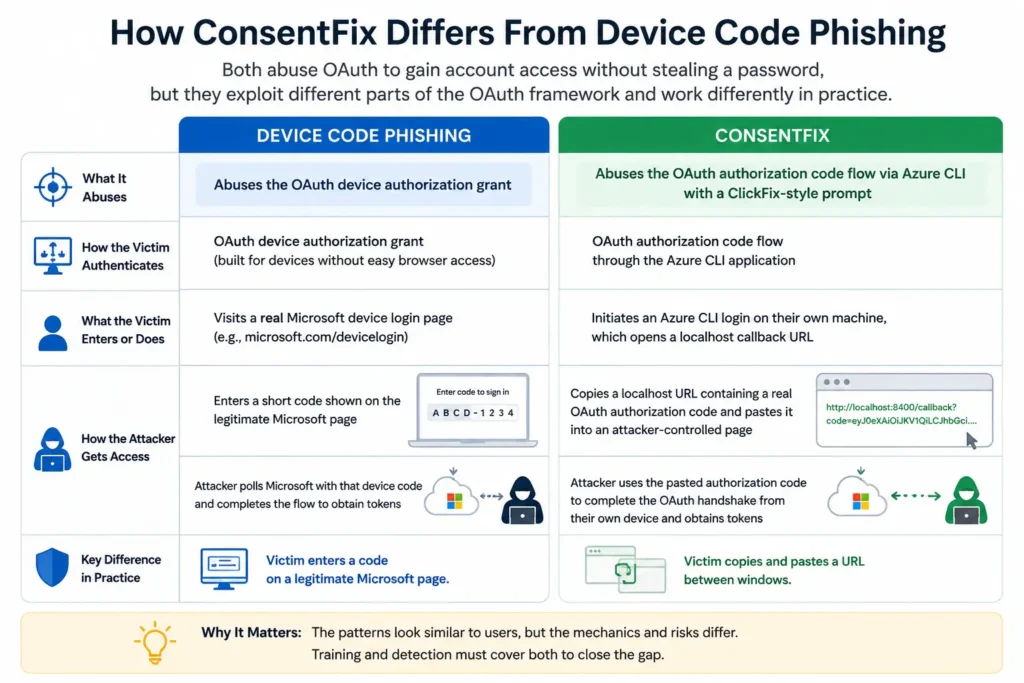
ConsentFix and device code phishing are often mentioned together because both abuse OAuth to gain account access without stealing a password, but they exploit different parts of the OAuth framework and work differently in practice.

Device Code Phishing

Device code phishing abuses the OAuth device authorization grant, a flow originally built for devices without an easy way to display a browser login screen, such as a smart TV or command-line tool. The victim visits a real Microsoft device login page and enters a short code, unknowingly authorizing the attacker’s session. Our guide on device code phishing covers this mechanism in detail.

ConsentFix

ConsentFix abuses the OAuth authorization code flow specifically through the Azure CLI application, combined with a ClickFix-style copy-and-paste prompt. The victim generates a genuine authorization code through a localhost callback on their own machine and pastes it into an attacker-controlled page, rather than entering a short code on an official Microsoft page.

The practical distinction matters for detection and training: device code phishing centers on entering a code on a legitimate Microsoft page, while ConsentFix centers on copying and pasting a URL between windows, the same core mechanic used in ClickFix and its variant FileFix. Employees trained to recognize one pattern will not automatically recognize the other unless both are covered explicitly.
How ConsentFix Differs From Device Code Phishing

Why ConsentFix Is Hard to Detect

A few specific factors make ConsentFix difficult for traditional security tools and typical user awareness to catch. According to Arctic Wolf’s analysis of the technique, the attack was first linked to a state-sponsored threat actor, underscoring both its sophistication and its likely spread to less advanced attackers over time, a pattern already seen with ClickFix and device code phishing.

No Credentials Are Stolen

Credential-based detection tools have nothing to flag. The victim never types a password anywhere.

MFA Does Not Reappear

The victim has no reason for suspicion. Since no new authentication challenge is triggered, the interaction feels like it ends normally.

Access Token Persists

The resulting access token persists independently of the account password. Resetting the victim’s password does not automatically revoke a token already issued through this method, the same challenge seen with device code phishing and other refresh-token-based attacks.

Legitimate Infrastructure

The interaction takes place entirely inside the browser, using legitimate Microsoft infrastructure, giving traditional endpoint and network security tools very little unusual activity to detect.

What This Means for Organizations

ConsentFix reinforces a pattern across an entire family of attacks, including ClickFix and device code phishing, that succeed by convincing a user to complete a legitimate-looking action themselves, rather than by exploiting a technical vulnerability directly. A few practical implications follow:

01. Token and Session Revocation

Incident response must include token and session revocation, not just password resets, since access obtained this way persists independently of the password.

02. Separate Administrative Work

Separating privileged administrative work from routine browsing reduces the attack surface, since these attacks generally require the victim to be performing cloud administration tasks in the same browser session used for everyday activity.

03. Cover Paste-and-Verify Prompts

Awareness training needs to explicitly cover paste-and-verify prompts as a category, not just the original Run-dialog version of ClickFix, since ConsentFix, FileFix, and similar techniques all rely on the same underlying instinct: complying with an unfamiliar copy-paste instruction because the surrounding page looks legitimate.

Testing Awareness Against This Pattern

Because ConsentFix relies on the same paste-and-comply instinct as ClickFix and FileFix, rather than a fake login page, testing for it benefits from the same behavioral, simulation-based approach already used for related techniques. Running a realistic verification-style scenario through a phishing test for employees shows whether your team pauses before pasting an unfamiliar code or URL into any system prompt, regardless of which specific technique is behind it. Tracking this alongside other paste-and-run techniques feeds into a more complete employee phishing risk score.

Final Thoughts

ConsentFix is a reminder that the paste-and-comply trick behind ClickFix was never limited to installing malware. The same instinct, trusting a legitimate-looking page enough to paste something into it without questioning why, can just as easily hand over a valid, persistent connection to a cloud account. As attackers continue finding new legitimate processes to redirect for this purpose, the underlying defense stays the same: treat any unsolicited instruction to copy and paste something into a system prompt as a reason to stop and verify first, no matter how official the surrounding page looks.

FAQ

What is a ConsentFix attack?

ConsentFix is a phishing technique that tricks a victim into copying a URL containing a genuine OAuth authorization code and pasting it into an attacker-controlled page, giving the attacker a valid, authenticated connection to the victim’s Microsoft account without stealing a password or triggering additional MFA prompts.

How is ConsentFix different from device code phishing?

Both abuse OAuth to gain account access, but they exploit different flows. Device code phishing uses the OAuth device authorization grant, where a victim enters a short code on an official Microsoft page. ConsentFix uses the OAuth authorization code flow via a localhost callback URL, combined with a ClickFix-style copy-paste prompt targeting the Azure CLI application specifically.

Does resetting a password stop a ConsentFix attack?

Not entirely. The access token obtained through ConsentFix can persist independently of the victim’s password, similar to other OAuth-based attacks. Security teams need to explicitly revoke active sessions and tokens, not just reset the password, to fully remove the attacker’s access.

Who discovered ConsentFix?

Push Security publicly documented and named ConsentFix in December 2025, initially observing it in a campaign attributed to a Russian state-affiliated threat actor.

How can employees recognize a ConsentFix attempt?

The clearest defense is treating any unsolicited request to copy and paste a code or URL into a verification page as suspicious, regardless of how legitimate the surrounding page looks, since the underlying Microsoft infrastructure involved is often completely genuine.

Content Reviewed By

Mohammed Nawaz Sajjad, Sr. Security Analyst at PhishCare
Mohammed Nawaz Sajjad
Sr. Security Analyst at CyberSapiens | Phishing Simulation | Ethical Hacker | Bug Hunter | Red Team

Nawaz is a practising security analyst specializing in phishing simulation campaigns, employee awareness assessments, red team exercises, and ethical hacking. He leads phishing simulation deployments at PhishCare, a product developed by CyberSapiens, with hands-on experience evaluating and deploying phishing simulation tools across organizations in multiple industries and regions globally.

View LinkedIn Profile


ConsentFix shows attackers will keep finding new legitimate processes to abuse.

See how realistic phishing simulation prepares your team to pause before pasting, no matter what page is asking, with a free PhishCare demo account. No credit card required.