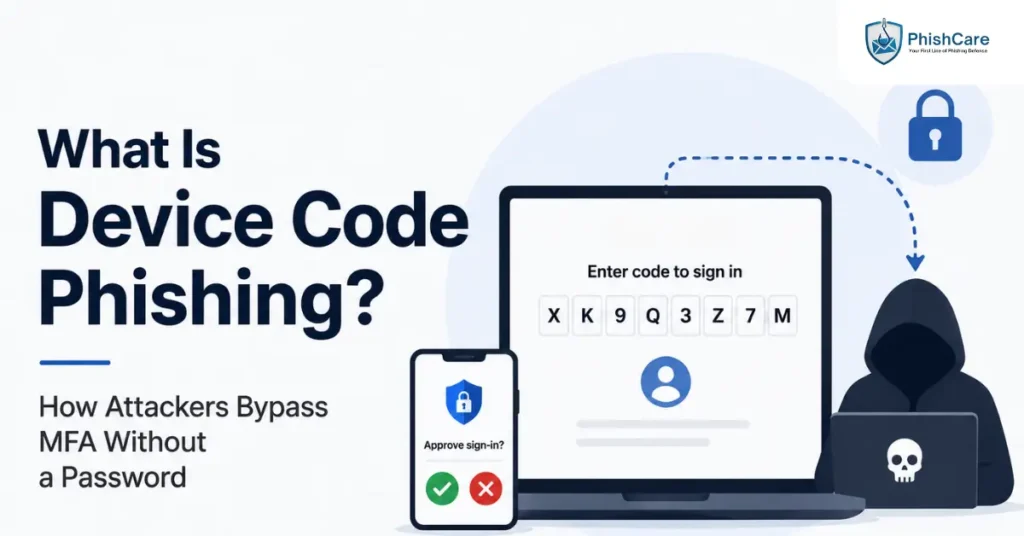
Multi-factor authentication is supposed to be the safety net that catches a stolen password. Device code phishing gets around it without ever touching a password, and without technically breaking MFA at all. The victim enters a code, approves a login, and completes their own multi-factor challenge exactly as they normally would. The problem is who they just approved it for.
This guide explains what device code phishing is, how the attack actually works, why it has scaled so quickly since 2025, and what makes it unusually difficult to clean up once it succeeds.
In Short
Device code phishing tricks a user into entering a legitimate-looking code on a real Microsoft login page, which grants the attacker a valid, MFA-approved session. No password is stolen, and MFA is never technically bypassed. It is simply completed on the attacker’s behalf.
How Device Code Phishing Actually Works
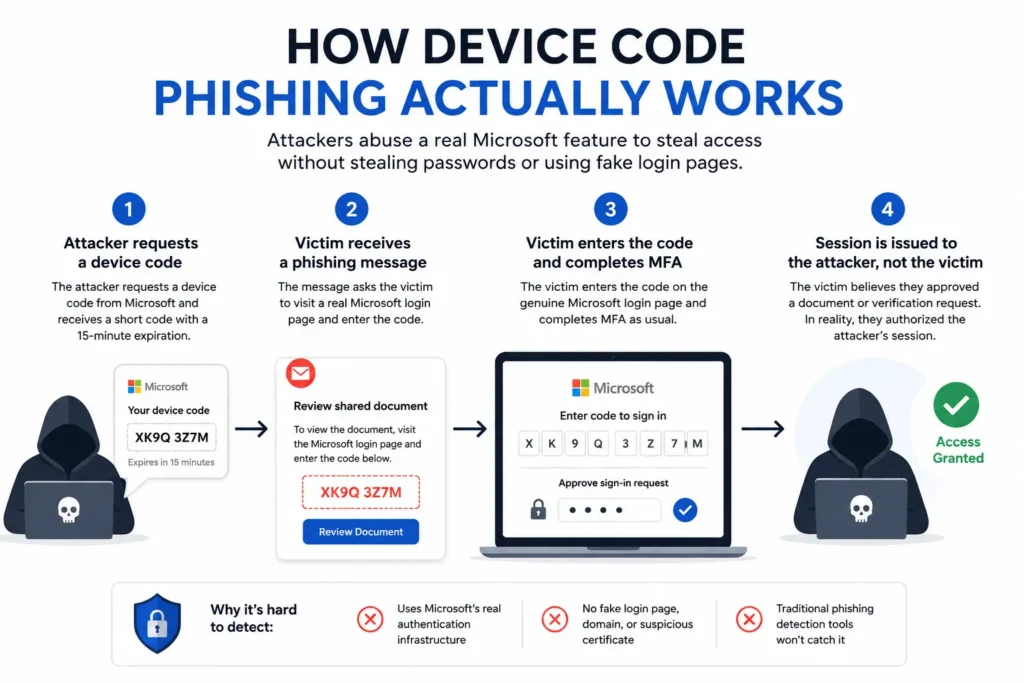
Device code phishing abuses a real, legitimate feature called the OAuth device authorization grant, originally built for devices that cannot easily display a normal browser login screen, such as a smart TV, a CLI tool, or a conference room device. According to Trend Micro’s research on the technique , the victim signs in and approves the request on the genuine Microsoft login page, so no password is stolen and no fake login form is ever involved.
A typical attack chain looks like this:
The attacker requests a device code from Microsoft’s own authentication system, receiving a short alphanumeric code with a normal expiration window, usually around 15 minutes.
The victim receives a phishing message, often impersonating a shared document, a token reauthorization request, or a security verification notice, instructing them to visit a real Microsoft login page and enter the code.
The victim enters the code and completes MFA themselves, using their own authenticator app or security key, exactly as they would for a legitimate login.
The session is issued to the attacker, not the victim. The victim believes they approved a document or verification request. In reality, they authorized the attacker’s session.
Because every step happens on Microsoft’s actual authentication infrastructure, there is no lookalike domain, no suspicious certificate, and no fake login form for either the victim or traditional phishing detection tools to catch.
Why Password Resets Don’t Fix It
The part of device code phishing that catches security teams off guard is what happens after the initial compromise is discovered. A successful attack typically grants the attacker a refresh token, a credential that persists independently of the victim’s password and can maintain access for an extended period.
This means the standard incident response instinct, reset the compromised user’s password, does not remove the attacker. The refresh token survives a password change, so security teams need to explicitly revoke active sessions and tokens, not just reset credentials, to actually evict an attacker who gained access this way.
Why This Attack Is Scaling So Fast
Device code phishing is not a brand-new technique, but its use has expanded dramatically. Microsoft first disclosed a cluster of this activity, tracked as Storm-2372, in early 2025, attributing early campaigns to a state-aligned threat actor targeting government agencies, defense contractors, and energy sector organizations. Since then, adoption has spread well beyond nation-state actors.
Microsoft’s Defender Security Research team has since documented campaigns using AI-assisted, end-to-end automated infrastructure that generates dynamic codes and evades the standard 15-minute expiration window, allowing attackers to run this technique at a scale that manual campaigns could never sustain. As the underlying method became publicly documented, it followed a familiar pattern: technical barriers dropped, off-the-shelf phishing kits emerged, and criminal groups with far less sophistication began adopting a technique that was originally the domain of advanced, well-resourced attackers.
What This Means for Organizations
A few practical realities follow from how this attack works:
Security Awareness Training
Security awareness training focused on spotting fake login pages does not address this. There is no fake page to spot. The login page is real.
MFA Protection
MFA alone is not sufficient protection, since the attack does not attempt to defeat MFA, it relies on the victim completing it correctly.
Incident Response
Incident response procedures need to explicitly include token and session revocation, not just password resets, for any suspected device code phishing compromise.
Employee Awareness
Employees need a different mental model than “check the URL.” The relevant instruction is closer to: never enter a code you did not personally initiate, regardless of how legitimate the surrounding page looks.
This is part of a broader pattern of attacks that succeed by using an organization’s own legitimate infrastructure against it, rather than building convincing fakes. Our guide on the ClickFix attack covers a related technique that similarly avoids traditional red flags like a malicious attachment or link, relying instead on convincing a user to take an action themselves.
Building Awareness Without Relying on Old Instincts
Because device code phishing does not fit the traditional “spot the fake link” model most awareness training was built around, testing for it requires the same behavioral, simulation-based approach already proven effective for other social engineering techniques. Running realistic pretexts, such as a fake document-sharing or reauthorization request, through a phishing test for employees shows which teams would actually pause before entering an unsolicited code, the same way testing works for any other technique that exploits a legitimate process rather than a fake one.
Tracking how employees respond to attacks like this over time, alongside more familiar phishing attempts, feeds into a more complete employee phishing risk score , since an organization’s real exposure depends on more than just whether people click obviously suspicious links.
Final Thoughts
Device code phishing works precisely because it does not ask anyone to trust something fake. It asks them to complete something real, on the attacker’s behalf, without realizing it. As more attackers adopt techniques that abuse legitimate infrastructure rather than building convincing forgeries, awareness training that only teaches employees to inspect URLs and certificates is going to keep missing an increasing share of real attacks.
Frequently Asked Questions
What is device code phishing?
Device code phishing is an attack that abuses a legitimate OAuth feature designed for devices without an easy way to display a login screen. Attackers trick victims into entering a code on a genuine login page, which grants the attacker a valid, authenticated session instead of the victim.
Does device code phishing actually bypass MFA?
Not technically. The victim completes their own multi-factor authentication challenge as normal. The attack works by redirecting the resulting authenticated session to the attacker rather than defeating MFA itself.
Why doesn’t resetting a password stop a device code phishing attack?
A successful attack typically issues the attacker a refresh token, which persists independently of the victim’s password. Security teams need to explicitly revoke active sessions and tokens, not just reset the password, to remove the attacker’s access.
How can employees recognize a device code phishing attempt?
The clearest rule is to never enter an authentication code that was not personally and intentionally requested, regardless of how legitimate the surrounding message or login page appears, since the login page itself is often completely genuine.
Is device code phishing only a Microsoft 365 problem?
Most widely documented campaigns have targeted Microsoft 365 environments specifically, since the technique abuses Microsoft’s device authorization flow, but the underlying OAuth mechanism exists more broadly, and organizations using other platforms with similar device authorization flows should be aware of the same risk pattern.
See How Your Team Responds to Modern Phishing Attacks
Device code phishing works because it targets human trust in a legitimate process, not a fake one. See how realistic phishing simulation prepares your team for attacks like this with a free PhishCare demo account, no credit card required.
Content Reviewed By

Nawaz is a practising security analyst specializing in phishing simulation campaigns, employee awareness assessments, red team exercises, and ethical hacking. He leads phishing simulation deployments at PhishCare, a product developed by CyberSapiens, with hands-on experience evaluating and deploying phishing simulation tools across organizations in multiple industries and regions globally.
View LinkedIn Profile