Last updated · Reviewed by Ketki Tidke, Certified ISO 27001 Lead Auditor, CyberSapiens · PhishCare is a product developed by CyberSapiens.
Quick answer
A cyber security audit checklist lists the controls an auditor will check: governance, assets, access, patching, hardening, backups, network and cloud, logging and incident response, suppliers, and staff awareness. This 50-point checklist follows the ASD Essential Eight and good practice for Australian businesses. Tick what you can prove with evidence today; every gap is a priority for your action plan.
10 areas
auditors review
50 checks
you can score today
8 strategies
of the Essential Eight covered
What is a cyber security audit?
A cyber security audit is a structured review of how well your business protects its systems, data and people. The auditor checks your controls against a framework, collects evidence that each control works, and reports the gaps ranked by risk.
A checklist is the backbone of that work. It makes sure nothing is missed and lets you compare results year on year. In Australia, most checklists are built around the ASD’s Essential Eight maturity model, with extra checks for governance, suppliers and people.
Before you start: set your audit scope
A clear scope keeps the audit focused and the cost predictable. Agree these four things before anyone opens the checklist:
Why
Insurer, tender, board, certification or an incident.
What
Sites, systems, cloud accounts and applications in scope.
Against what
Essential Eight, ISO 27001, SOC 2 or a mix.
Who
Internal team, your IT provider, or an independent auditor.
The cyber security audit checklist (50 checks)
Answer each check yes only if you can show evidence, such as a report, a screenshot, a signed policy or a log. “We think so” counts as no.
1. Governance and policies
- An information security policy approved by leadership in the last 12 months
- A named person accountable for cyber security
- A cyber risk register reviewed at least quarterly
- Acceptable use, password and remote work policies signed by staff
- Cyber risk reported to the board or owners at least twice a year
2. Asset inventory
- A current list of laptops, servers, phones and network devices
- A list of approved software and cloud services (SaaS)
- An owner recorded for each critical system
- Locations of sensitive and personal information mapped
- A process for adding and retiring devices securely
3. Identity and access
- MFA on email, remote access and every admin account (Essential Eight)
- Admin privileges limited to the people who need them (Essential Eight)
- Separate admin and everyday accounts for IT staff
- Leavers’ access removed on their last day
- User access reviewed at least every quarter
4. Patching and vulnerability management
- Operating systems patched on a defined schedule (Essential Eight)
- Applications and browsers patched on a defined schedule (Essential Eight)
- Critical internet-facing vulnerabilities fixed fastest
- Unsupported software and systems replaced or isolated
- Regular vulnerability scans with results tracked to closure
5. Application control and device hardening
- Only approved applications can run on workstations (Essential Eight)
- Microsoft Office macros restricted (Essential Eight)
- Browsers and Office apps hardened (Essential Eight)
- Disk encryption on all laptops
- Endpoint protection installed and monitored on every device
6. Backups and recovery
- Regular backups of important data, systems and settings (Essential Eight)
- At least one backup copy offline or immutable
- A restore tested in the last six months
- Backup access protected with MFA and separate credentials
- Recovery time targets agreed for critical systems
7. Network and cloud security
- Firewall rules reviewed and unused rules removed
- Guest and staff Wi-Fi separated from business systems
- Cloud accounts (Microsoft 365, AWS, Azure, Google) checked for misconfigurations
- Email protected with SPF, DKIM and DMARC
- A penetration test of internet-facing systems in the last 12 months
8. Logging, monitoring and incident response
- Security logs collected centrally and kept for a defined period
- Alerts for suspicious sign-ins and admin changes
- A written incident response plan with named roles
- The plan tested with a tabletop exercise this year
- A process for reporting eligible data breaches and, where it applies, ransomware payments
9. Suppliers and third parties
- A list of suppliers with access to your systems or data
- Security checked before onboarding critical suppliers
- Security and breach notification terms in contracts
- Supplier access limited, logged and removed when no longer needed
- Key suppliers’ ISO 27001 certificates or SOC 2 reports on file
10. People and security awareness
- Security awareness training for every new starter
- Refresher training at least once a year for all staff
- Regular phishing simulations with results tracked over time
- An easy way for staff to report suspicious emails
- Training records kept per employee
For area 10, PhishCare’s campaign reports provide an additional documentation boost for organisations working towards ISO 27001, SOC 2 Type II or the Essential Eight, where ongoing security awareness training is recognised as a best practice by auditors. See the format in this phishing simulation sample report.
How to score your checklist
Give yourself one point for every check you can prove. Use the total as a rough guide only; an independent audit tests whether controls actually work.
| Score | What it usually means | Next step |
|---|---|---|
| 40 to 50 | Strong foundations | Independent audit to confirm, then aim for certification |
| 25 to 39 | Important gaps in a few areas | Fix the Essential Eight items first |
| Under 25 | High exposure to common attacks | Get an audit and a prioritised roadmap now |

Want an expert to run this checklist for you?
CyberSapiens Lead Auditors test every item, score your Essential Eight maturity and give you a risk-ranked plan. Talk to Claude Pinto, Director at CyberSapiens Australia, and get a fixed quote within 24 hours.
Essential Eight checklist at a glance
The ASD scores each strategy from Maturity Level 0 to 3. Most Australian businesses aim for Maturity Level 1 or 2 first.
| Strategy | What an auditor looks for |
|---|---|
| Patch applications | Timely updates, no unsupported apps |
| Patch operating systems | Timely OS updates, supported versions only |
| Multi-factor authentication | MFA on remote access, email and admin accounts |
| Restrict administrative privileges | Few admins, separate accounts, regular reviews |
| Application control | Only approved programs can run |
| Restrict Microsoft Office macros | Macros blocked unless needed and trusted |
| User application hardening | Browsers and Office locked down |
| Regular backups | Backups protected and restores tested |
Types of cyber security audits
Internal audit
Run by your own team with this checklist. Good for tracking progress, but not independent.
External audit
Run by an independent firm. What insurers, boards and customers trust.
Compliance audit
Measures you against one standard, such as the Essential Eight, ISO 27001 or SOC 2.
Technical audit
Penetration testing and configuration reviews that prove what can be exploited.
Preparing for a certification? See ISO 27001 certification in Australia or SOC 2 certification in Australia.
Small business cyber security audit: where to start
Short on time? These five checks stop the most common attacks on small Australian businesses:
- 01Turn on MFA for email and remote access
- 02Turn on automatic updates everywhere
- 03Back up, keep one copy offline, test a restore
- 04Remove admin rights from everyday accounts
- 05Train staff to spot and report phishing
What a cyber security audit report should include
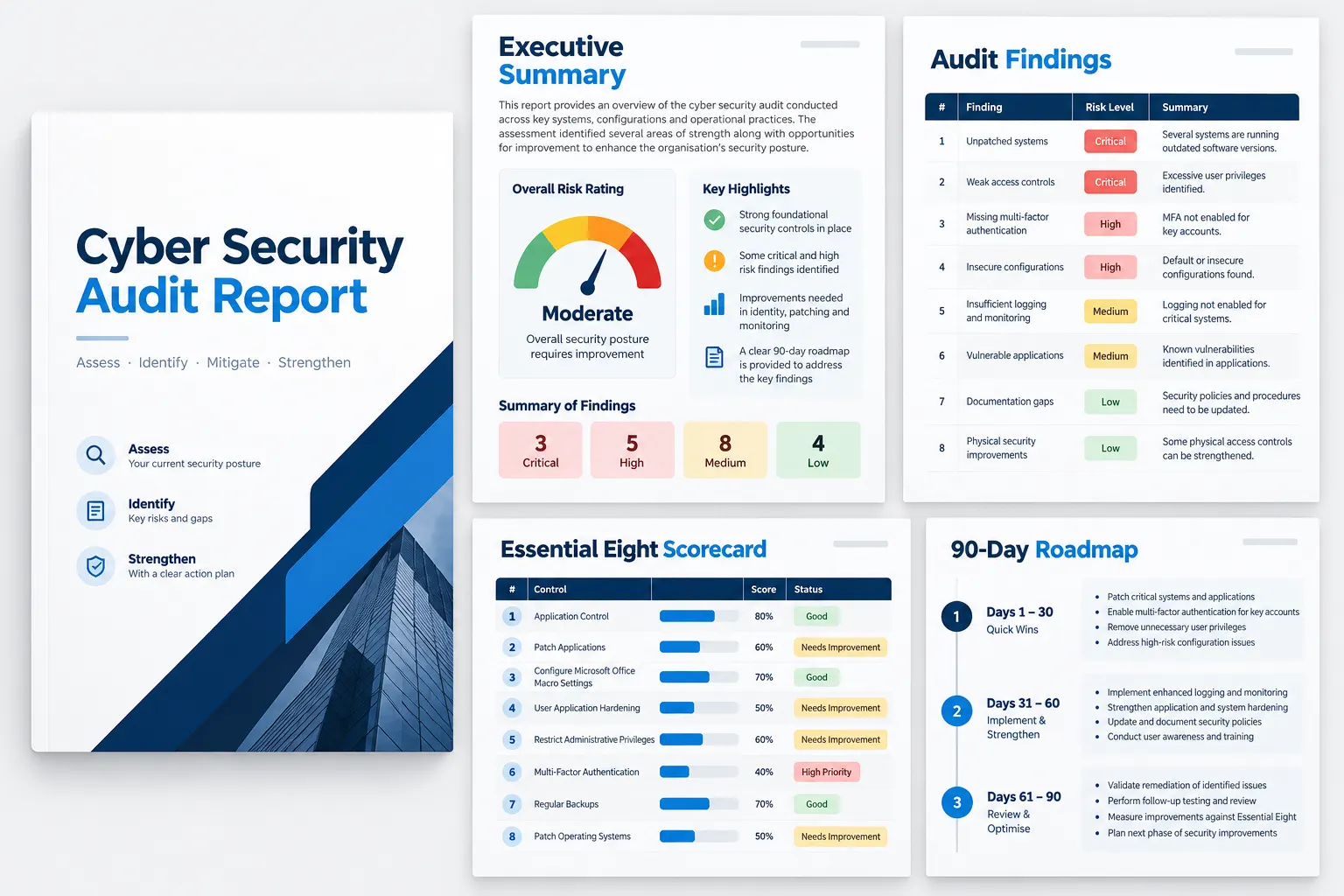
Whoever runs your audit, the report should give you five things:
- An executive summary your board can read in five minutes
- Findings rated critical, high, medium or low, each with evidence
- An Essential Eight scorecard with current and target maturity
- Penetration test and phishing results, if they were in scope
- A prioritised roadmap, with quick wins first
How much does a cyber security audit cost in Australia?
The cost depends on scope rather than a fixed menu: the number of staff and sites, the frameworks you need, how many systems are penetration tested, and whether a phishing simulation is included. Ask for a fixed price so scope changes are visible before they become invoices.
CyberSapiens quotes one fixed AUD price within 24 hours of a free scoping call.
Get your fixed quoteCyber security audit checklist FAQs
What should a cyber security audit checklist include?
It should cover governance and policies, asset inventory, identity and access, patching, application control and hardening, backups, network and cloud security, logging and incident response, suppliers, and staff security awareness.
Can I use this checklist as a cyber security audit template?
Yes. Copy the 50 checks into a spreadsheet, add columns for evidence, owner and due date, and repeat the review every quarter to track progress.
How often should a business do a cyber security audit?
Run an internal checklist review every quarter and an independent audit at least once a year, or after a major change such as a new IT provider, a merger or a security incident.
Is the Essential Eight mandatory for Australian businesses?
Not for most private businesses, but it is the ASD’s recommended baseline and is widely used by government buyers, insurers and enterprise customers to judge suppliers.
What is the difference between an IT audit and a cyber security audit?
An IT audit looks at IT governance, processes and controls in general. A cyber security audit focuses on protecting systems and data from attack, including access, patching, testing and staff awareness.
Can we audit ourselves, or do we need an external auditor?
A self-assessment is a good start, but insurers, boards and customers usually expect an independent review that tests whether controls actually work.
Turn your checklist into a clear action plan
Independent cyber security audits for Australian businesses, with Lead Auditors from day one and a fixed price.
CyberSapiens Australia, Lvl 1 206 Lorimer St, Port Melbourne · sales@phishcare.comContent Reviewed By

Ketki specialises in governance, risk and compliance for public, private and government clients across Australia, with experience across Essential Eight, ISO 27001, SOC 2, PCI DSS, NIST CSF, APRA CPS 234, VPDSS and the ISM.
View Ketki Tidke’s LinkedIn profile